
Contemporary weddings require more than the old-fashioned paper invitations. An invitation video gives an emotional and personal touch. It allows you to share a story rather than share a date. Video invites are new, individual, and interactive. This is the reason why more couples are turning to video instead of having still cards. They are attention-seeking and present the message in a stylish manner.
The emergence of platforms like the CapCut App has altered the process of creating invitations. The CapCut App, with its AI video maker, transforms simple data into a movie. That way, any user can create original and refined invites without having professional expertise.
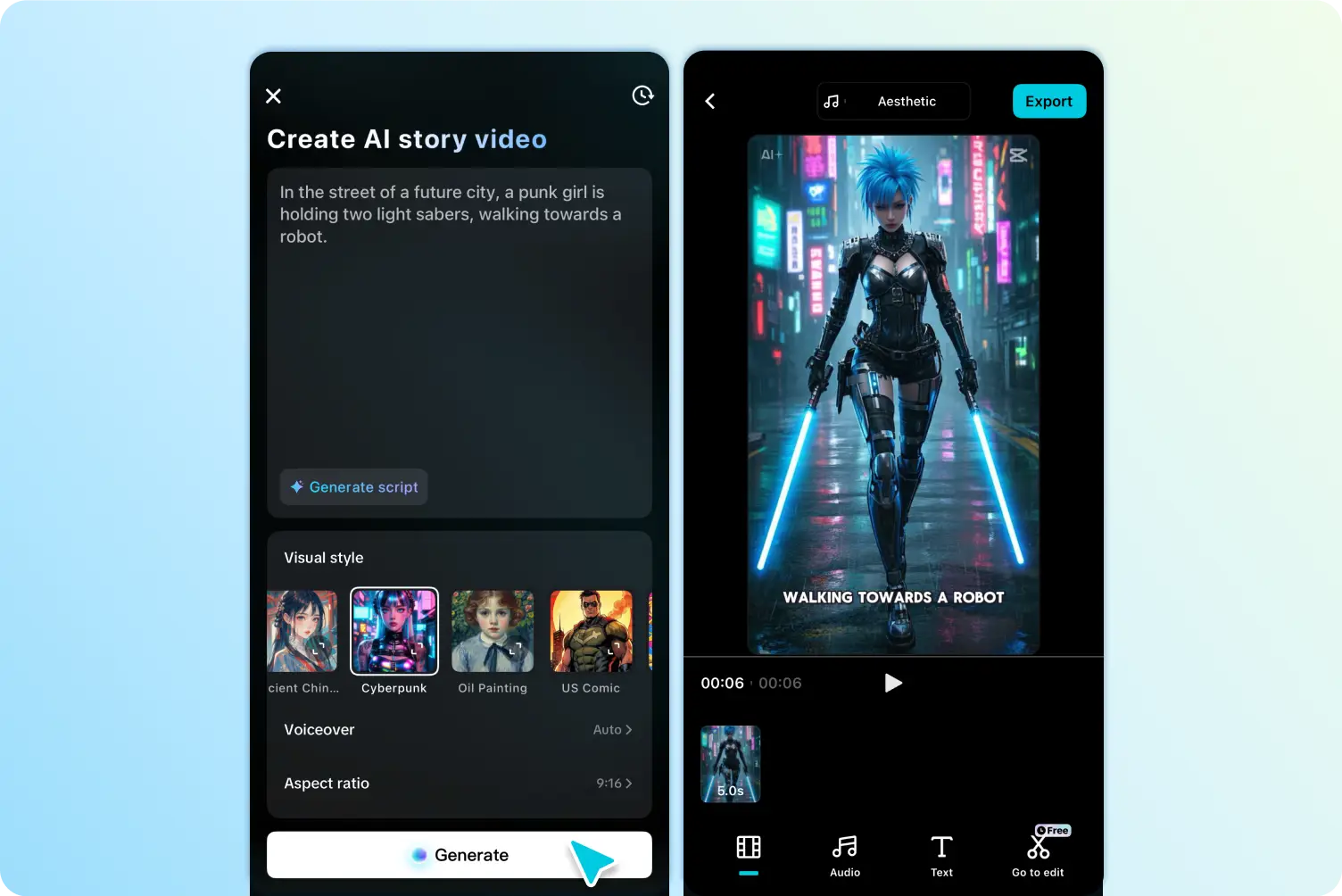
The AI features of the CapCut App AI lab enable you to create a complete wedding video. Start with the key information such as your names, date, venue, and wedding theme. The app processes this input to create a visual sequence.
This invitation, based on a story, appears cinematic and heartfelt. You do not receive a flat message but rather an emotional narrative. The video becomes more personal as you can select visual styles to match your theme. The app makes your love story feel original and perfectly animated.
The AI tools in the CapCut App allow you to create, edit, and share everything on a single platform. You do not have to be a guru at editing. The software manages visual transitions and pacing, as well as effects, so the output is professional.
The CapCut app offers ready-to-use templates that are specifically designed for weddings. There are romantic styles, including “Realistic Film”, “Watercolor”, and “Romantic Anime”. Every template provides your video with a particular atmosphere and appeal.
Creating a video invitation takes only a few minutes with the help of the drag-and-drop interface. Enter your information, select the template, and the app will do the job. These AI templates make it easier and yet elegant.
Templates can also be adjusted to various love stories and personalities. Regardless of whether your vibe is dreamy, modern, or traditional, you will find a corresponding visual format. This personalizes your wedding invitation.
To make it more whimsical, you can also add AI-generated couple avatars. These are characters that come to life in these avatars with fun and animation. The CapCut App allows you to include them in your invite video.
The message is amplified using voice-overs. Create audio voiceovers to share your story or deliver a heartfelt invitation. It is more like a video letter.
Music significantly contributes to the tone. The CapCut App allows you to create melodic, atmospheric, or your music. You may select songs that show your attachment and wedding theme. These factors, together, will make the invitation more engaging and memorable.
Once your video is complete, you can export it to various formats. The CapCut App is compatible with formats that are ideal for use with WhatsApp, Instagram, and email. This will ensure that everyone receives the invitation, regardless of the platform.
CapCut App exports are optimized for sharing on mobile. Your video is clean and loads quickly even on entry-level devices. This increases coverage and makes sure every visitor experiences everything.
Your invitation is graphic, whether you give it privately or publicly. You control the way it appears on all screens, and therefore, distribution is simplified.
You can also incorporate family traditions into your invitation by including location-specific pictures or images of cultural aspects. For example, display a monument or a piece of traditional folk clothing to symbolize your culture.
Music and fonts are essential too. Select your roots: script styles or folk tunes. In the CapCut App, you can adjust the text position and colors.
Theme stickers and filters can also be added to improve the cultural atmosphere. Such minor details are meaningful and address the heart of your attendees.
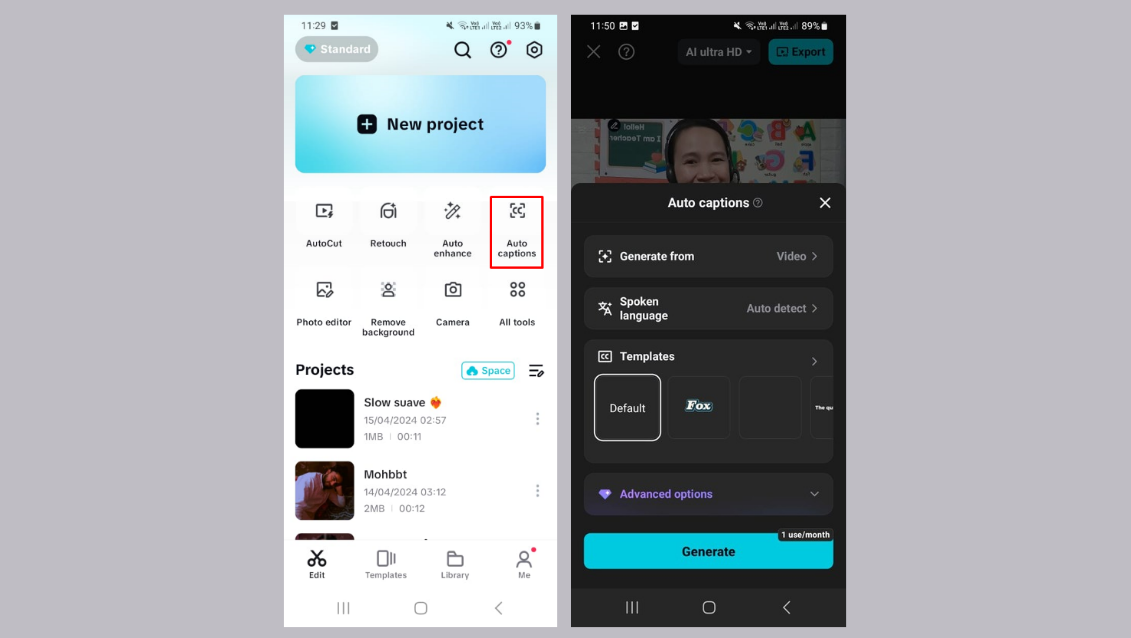
Optimize every line and make it noticeable and attractive using the AI caption generator. It makes the message readable, and it suits the tone of the video.
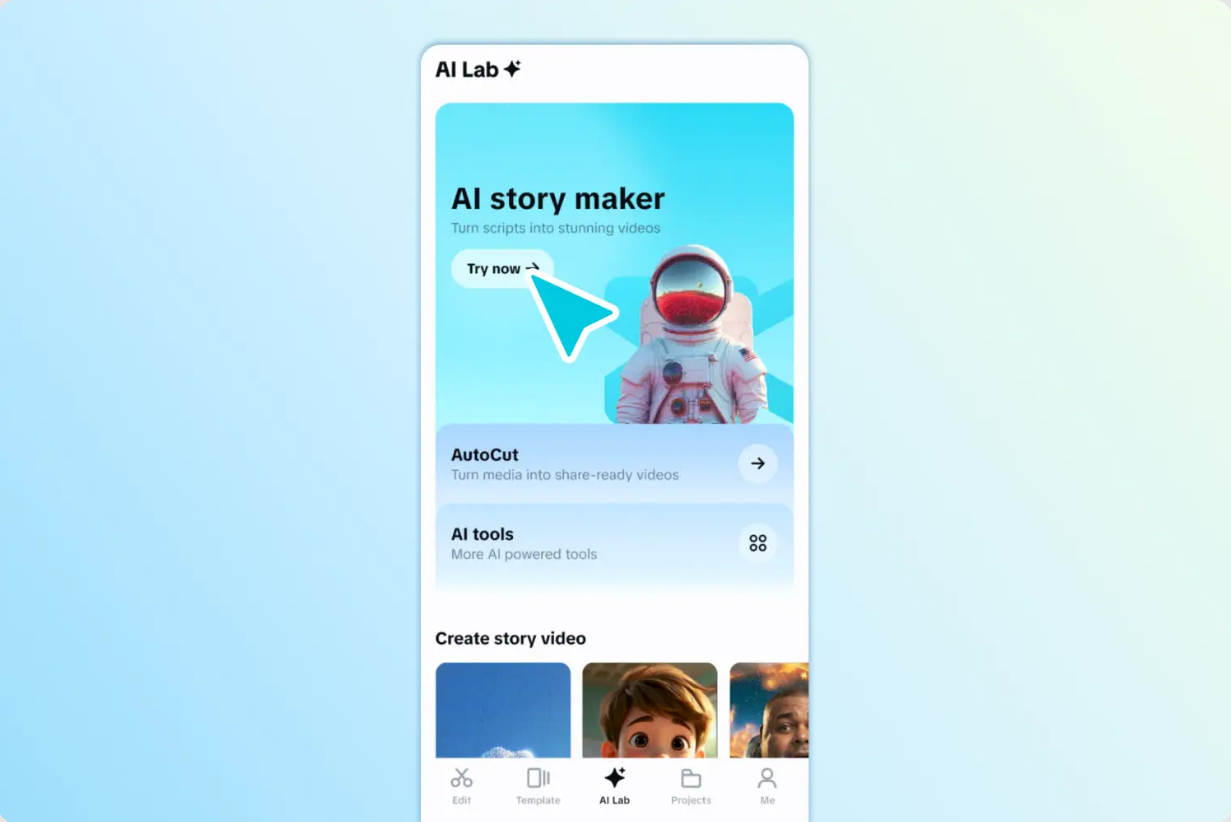
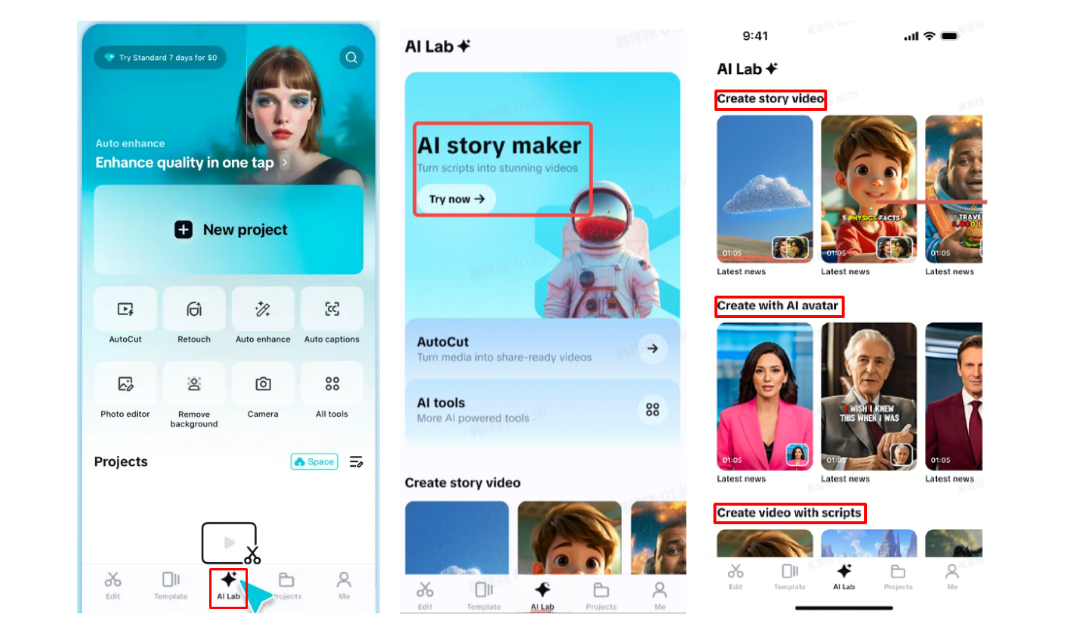
Step 1: Launch CapCut App Start by opening the CapCut app and tapping the “AI Lab” tab in the lower menu. This gives you access to the “AI story maker”—ideal for wedding invite creation. Scroll down to view available templates such as “Create story video”, “Create with AI avatar”, or “Create video with scripts”. Choose the one that fits your wedding invite theme best.
Step 2: Customize Invite Look Once you select a template, tap on “Try AI workflow”. Under “creating a video story about”, enter your invite message or wedding theme. Select a style like “Realistic film”, “Cartoon 3D”, or “Anime” to suit the mood of your wedding. Then, tap “Generate” and let the AI create a stunning video for your invitation.
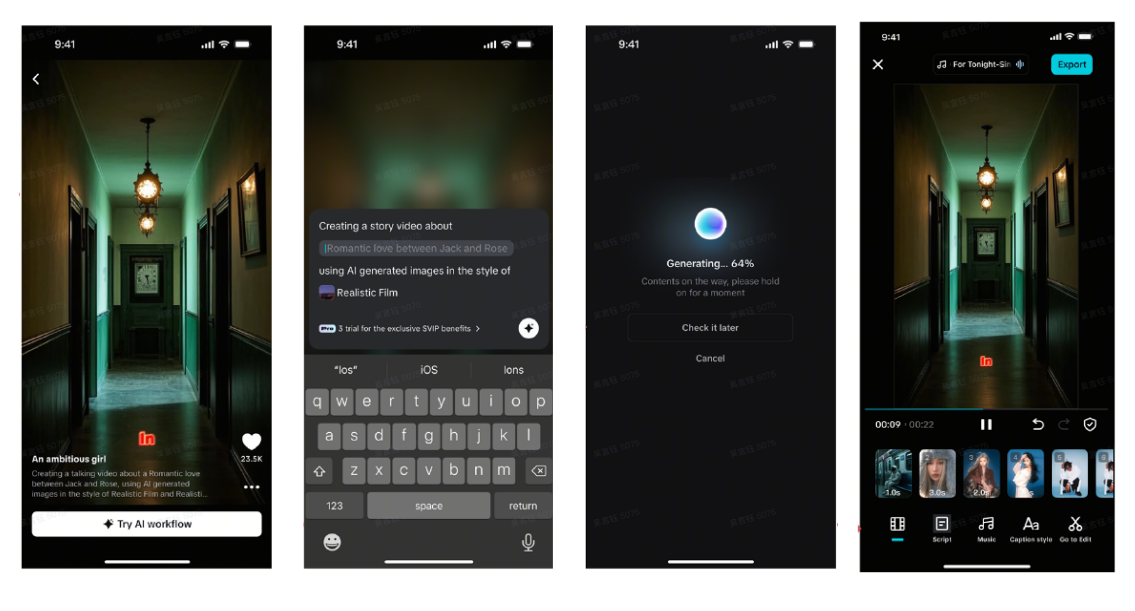
After it’s ready, use the “Music” tab to add romantic tunes. Customize the text using “Caption style” by adjusting the font or adding effects. Tap “Go to Edit” for more features—add stickers, transitions, and filters to enhance the final invite.
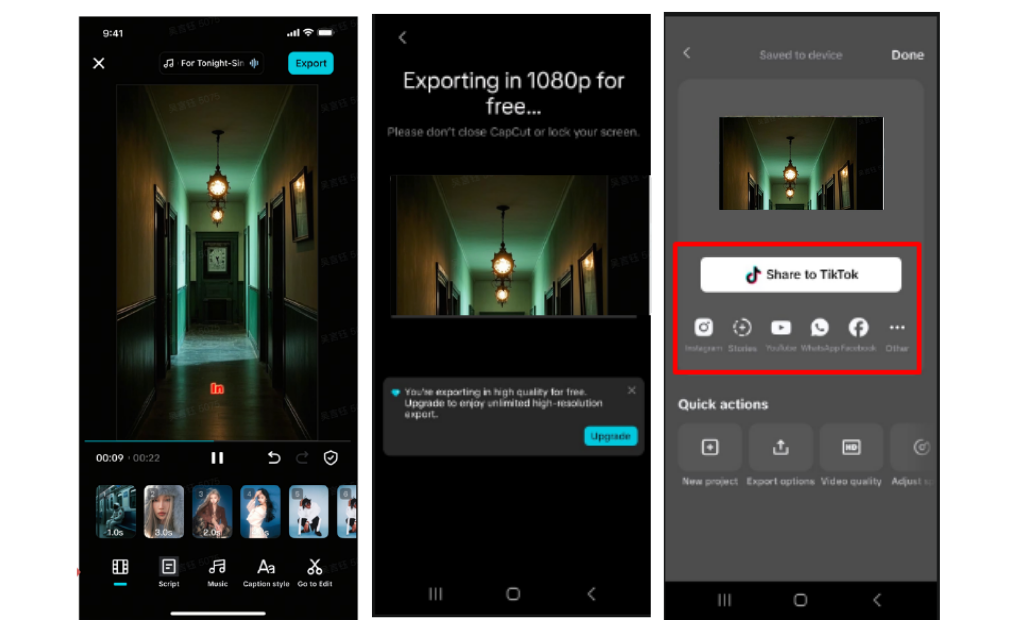
Step 3: Export to Device When you’re satisfied, tap “Export” on the top-right corner. The wedding invite video will save to your phone. Share your video invite via WhatsApp, Instagram, or email to your guests instantly.
Creating a wedding invite video used to be difficult and time-consuming. Now, the CapCut App makes it simple, fast, and visually stunning. From templates to music to AI avatars, everything is built for ease and creativity. You can craft meaningful invites that tell your love story in a way guests will remember. Embrace the power of storytelling and design a wedding video that’s both modern and personal.











