If you’ve spent any time trying AI image generators, you know the frustration. The hands look wrong. The text in the image is gibberish. The lighting feels awkward. The face loses consistency the moment you try to make any adjustments. These have been the persistent pain points of AI image generation for years — and ChatGPT Images 2.0 is making a serious case for having solved most of them.
OpenAI’s latest image generator, Images 2.0, represents a meaningful leap forward. It’s not just better — it’s better in the specific ways that actually matter to designers, marketers, content creators, and everyday users who need reliable, high-quality visual output. Here’s a thorough look at what’s new, what’s improved, and why the creative community is paying close attention.
Ask any designer what their biggest frustration with AI image generators has been, and text rendering will almost always come up. Previous models notoriously struggled to produce legible, correctly spelled text within images. Signs, labels, posters, menus, book covers, and any other element that required readable text were impossible for practical use.
ChatGPT Images 2.0 changes this in a way that feels almost jarring after years of accepting illegible text as an AI limitation. The model can now render clean, accurate, properly spelled text within images across a wide range of fonts, styles, and contexts. Business cards, event posters, product packaging, social media graphics with overlaid copy.
This single improvement alone dramatically expands the practical use cases for AI image generation in professional workflows.
The model demonstrates a sophisticated understanding of how light behaves — how it wraps around objects, creates soft shadows, reflects off different surface materials, and changes character depending on the time of day or light source type.
Skin tones are rendered with more nuance and accuracy. Textures — fabric, wood grain, metal, glass, skin — carry a tactile quality that earlier models flattened into something that looked almost right but not quite. Environmental depth and background blur behave more like a real camera lens than a simulated approximation of one.
Images generated through ChatGPT Images 2.0 require much less post-processing to be usable. For content creators who previously had to run AI outputs through additional editing software to make them look credible, this is a meaningful time saver.
One of the less-discussed improvements in ChatGPT Images 2.0 is how well the model follows detailed, multi-part instructions. Earlier systems would often drop elements from complex prompts, misinterpret spatial relationships, or simply ignore specific details in favor of a more generic interpretation.
The new model handles compositional complexity with much greater fidelity. You can specify the position of objects within a frame, describe the relationship between multiple subjects, request specific color palettes, define the mood and atmosphere of a scene, and ask for a particular aspect ratio — and the model will incorporate all of these elements with a level of accuracy that feels genuinely responsive rather than approximate.
Style consistency has been another long-standing weakness of AI image generation. Generate the same character twice and you’d often get two noticeably different people. Ask for a series of images in a consistent visual style and you’d get varying interpretations of that style rather than a cohesive set.
ChatGPT Images 2.0 shows meaningful improvement here. The model maintains visual consistency more reliably across multiple generations, which is critical for anyone building a brand identity, creating a series of illustrations, or developing character-driven content. While it isn’t perfect — no current model is — the improvement is noticeable enough to make multi-image projects significantly more manageable.
Beyond generation from scratch, ChatGPT Images 2.0 includes robust editing capabilities that allow users to modify specific elements of an existing image without regenerating. This functionality lets you select a region of an image and describe what you want to change, with the model filling in the selected area in a way that blends naturally with the surrounding content.
This is a game-changer for iterative creative work. Instead of starting over again and again, you can make targeted adjustments while preserving everything else. It brings AI image generation much closer to the kind of non-destructive editing workflow that professionals expect from tools like Photoshop.
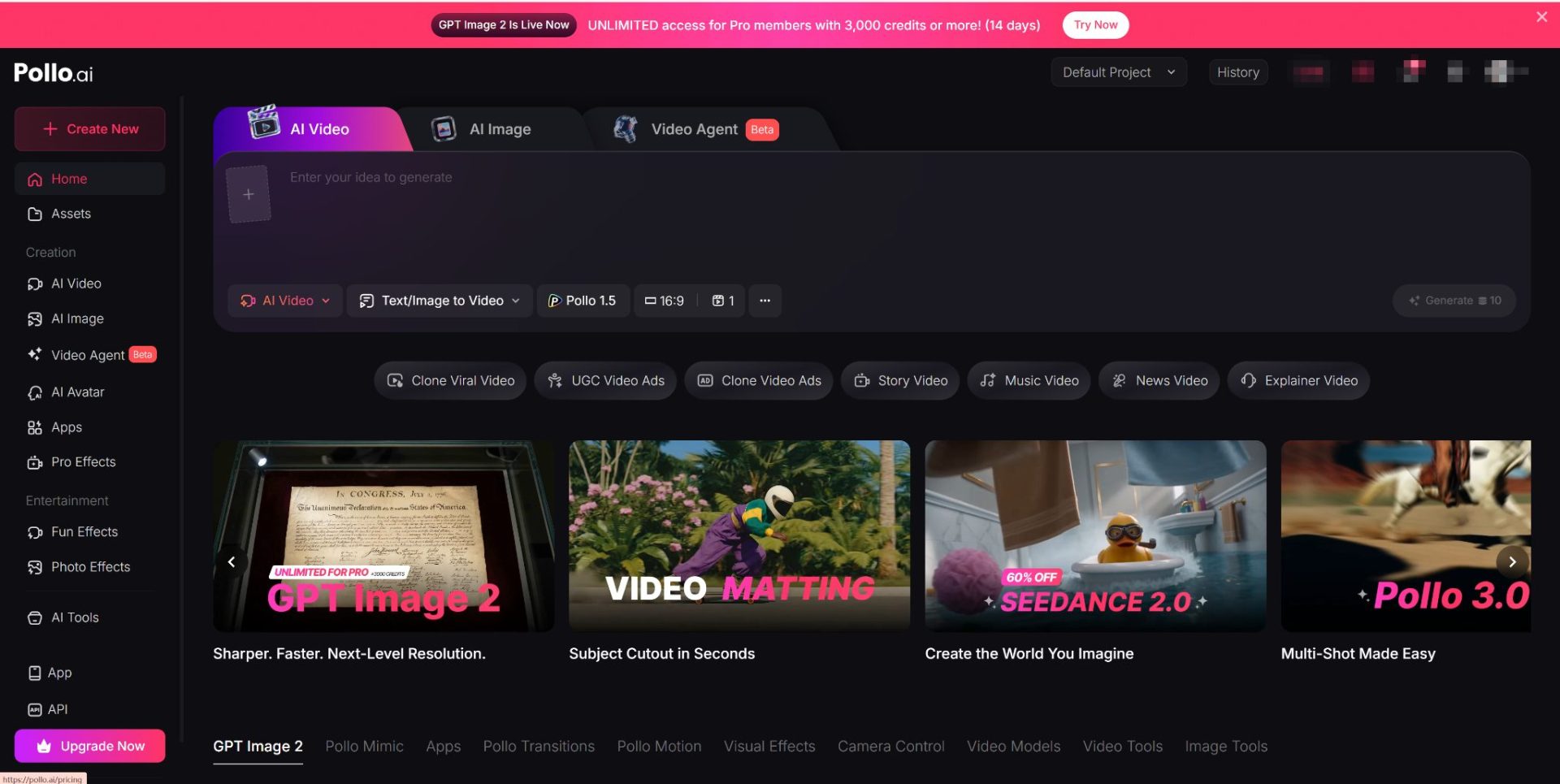
For creators who want to explore ChatGPT Images 2.0 without navigating multiple platforms, it’s worth knowing that the tool is accessible through Pollo.ai, an all-in-one AI creative hub that brings together leading image and video generation models in a single, streamlined interface. If you’re already using Pollo.ai to manage your AI creative workflow, you can work with ChatGPT Images 2.0 alongside other top-tier tools without switching between separate accounts — a practical convenience that saves real time.
The improvements in ChatGPT Images 2.0 don’t exist in a vacuum — they translate directly into expanded real-world utility across a wide range of industries and use cases.
E-commerce brands can generate product imagery and packaging mockups with readable labels and photorealistic textures. Social media managers can produce platform-ready graphics with accurate overlaid text and consistent visual. Publishers and authors can create book cover concepts and interior illustrations with reliable consistency. Architects and interior designers can visualize spaces with more accurate material rendering and lighting behavior. Educators can generate diagrams, infographics, and visual aids with legible labels and clear compositional logic.
The thread running through all of these applications is the same: ChatGPT Images 2.0 is capable enough to be genuinely useful in professional contexts rather than just impressive in demonstrations.
ChatGPT Images 2.0 represents a maturation of generative AI from a novelty into a legitimate creative tool. The improvements in text rendering, photorealism, instruction following, style consistency, and editing capability aren’t isolated features — they work together to close the gap between what AI can generate and what professional creative work actually requires.
There will always be tasks that benefit from human artistic judgment, cultural sensitivity, and creative intuition that no model can fully replicate. But for the broad middle ground of visual content needs, ChatGPT Images 2.0 is now capable enough to be a serious part of the workflow rather than a starting point that requires extensive manual correction.