
Video editing on a Mac has never been more accessible, but no matter how much raw hardware power you throw at it, a smooth workflow is dependent on the software.
In other words, the Apple ecosystem provides creatives with an unparalleled foundation to build on. However, what you use on top of that baseline determines your speed, output quality, and, importantly, how long your Mac stays healthy under heavy workloads!
It doesn’t matter if you are only editing social content or feature films, having a full toolkit across multiple functions keeps everything efficient from prep to post!
In this article, we look at what your ideal Mac toolkit for video editing should look like in 2026.
Final Cut Pro is the gold standard for Mac-native video editing. It is built natively for Apple Silicon and takes full advantage of the M-series chip architecture, resulting in faster renders, better playback, and no fan noise during long export times.
The magnetic timeline feature allows editors to move clips around without creating gaps or offline media issues by accident. Multicam editing capabilities, color grading, and spatial video support also make it a viable option for creators and broadcasters alike.
With a one-time fee of $299.99, it makes much more financial sense over time than other monthly subscription services. If you are going to spend many hours in an editing suite on a Mac, it is highly recommended as a good place to start.
DaVinci Resolve earns a spot in the best Mac toolkit for video editing thanks to its pro-grade color correction capabilities. It was initially developed for Hollywood colorists and has since evolved into a complete post-production platform with editing, audio mixing, visual effects, and motion graphics—all in a single toolkit.
The free version is seriously high-powered and can handle most pro projects without restrictions. Its Fusion tab also integrates node-based compositing into the timeline workflow, eliminating the need for a standalone VFX tool.
Blackmagic Design updates DaVinci Resolve frequently, and the Mac version works well on both Intel and Apple Silicon hardware. Editors who demand precision control over their colors and want a strong free option have few reasons to look elsewhere from DaVinci Resolve.
Adobe Premiere Pro continues to dominate the industry with its fluid and accelerated workflows. If you are an editor who also regularly works in After Effects, Photoshop, or Audition, then it makes sense to stay within the Adobe Creative Cloud family.
Adobe Dynamic Link enables real-time, seamless collaboration between Premiere Pro and After Effects, allowing you to create compositions, apply motion graphics, or visual effects without intermediate rendering or exporting. The tool’s AI-assisted features now streamline editing, enabling users to add or remove objects in a scene or extend an existing clip.
Adobe Premiere Pro runs on Mac with solid Apple Silicon optimization following recent updates. On top of that, the interface is familiar enough that editors switching from Windows face almost no learning curve.
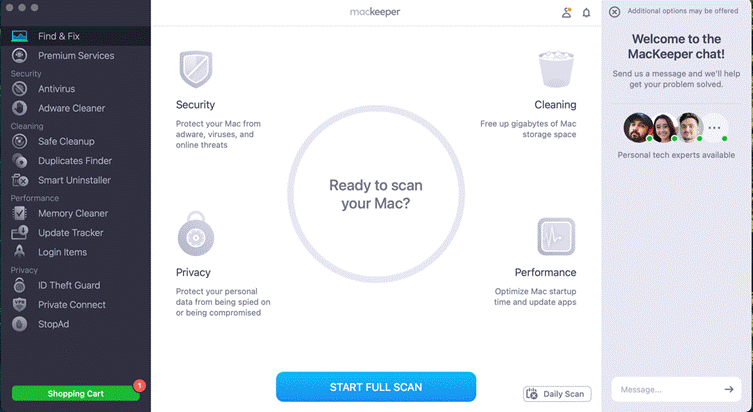
No editing software functions at its peak when faced with a bloated Mac full of junk files, cache files, and leftovers of past installations. That’s why MacKeeper is one of the first tools you need in your toolkit because it directly affects how every other application on this list runs.
For instance, Mackeeper’s dedicated MacBook cleaner feature scans your system for temporary files, duplicate media files, and render cache – all of which can pile up quickly when you’re editing. This frees up more space for your other video editing tools to run smoothly.
But it’s so much more than that: MacKeeper also offers antivirus protection, memory optimization, and real-time security monitoring in one interface. Fully notarized by Apple and AV-TEST certified, Mackeeper will help your Mac function at its best when editing videos.
Not every tool in a video editing toolkit needs to handle the creative work for you. HandBrake is a free, open-source video transcoder that editors can use to convert media from one format to another quickly and without any loss of quality.
As a video editor, you’re given source material that isn’t easily read by editing applications, and HandBrake makes it easy to convert the files. It supports H.264, H.265, AV1, and many other video codecs, with the Mac version using hardware acceleration to hasten those exports.
The software also supports batch processing—meaning you can set multiple files up for conversion or transcoding and let them run in a queue as you focus on more important tasks.
Audio is half the story in any video, and weak sound can undermine even the sharpest edit. Logic Pro is Apple’s professional digital audio workstation, and it integrates directly into a Mac-based post-production workflow in a way that third-party audio tools rarely match.
It ships with an enormous library of royalty-free loops, sound effects, and cinematic instruments, which means editors can score original music for a project without sourcing assets elsewhere. The noise reduction, dialogue cleanup, and spatial audio tools are production-grade features that used to require a dedicated audio engineer.
Logic Pro costs $199.99 as a one-time purchase and runs natively on Apple Silicon with the same low-latency efficiency that makes Final Cut Pro feel fast. If you want polished audio handled on the same machine, Logic Pro closes a gap that most editing suites leave wide open.
Creating your Mac video editing toolkit does not mean hedging and getting everything out there. The 6 best tools covered here do everything related to modern-day-to-day editing work, whether it’s cutting room, color cleanup, audio cleanup, format feed, or bug fixes for the client.
High-end creative commercial suite Final Cut Pro and DaVinci Resolve do most of the creative heavy lifting. Adobe Premiere Pro makes it easy if you enjoy cross-platform workflows. Apple Logic Pro will help you get soundscapes in shape for your short film, while HandBrake, as a free, open-source tool, makes better work of the shipping aspect ratio.
However, before you even get started, MacKeeper helps keep everything under control, ensuring junk files, large cache files, and remnants of past installations don’t eat up space and affect how the other video editing tools function on your Mac.











