
Learn new useful tips using Photoshop
Use Cool simple Photoshop effects to give great effects to images. Click here to learn more.
Use Photoshop textures to give great looking textures to images. Click here to learn more.
When you save images for the web using Photoshop.
After slicing your images, click on File/Save for web. The following screen will appear :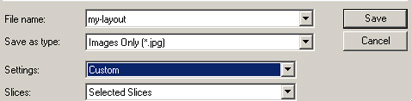
Save as type: Now the tip is: Choose Images Only.
Settings: Choose Other
The following screen will appear :

The next tip is:
Unclick the Put images in folder. This tip will help you avoid unnecessary creation of the image folder.
Slices: Choose selected slices.
Click here to learn about slicing and exporting images in photoshop

 custom shape tool from the tools panel.
 (third button seen in the tools panel in the left).
 and select the shape.
 .
.











