In this tutorial you will learn how to create an amazing cosmic effect using Photoshop.

Program: Photoshop CS5
Estimated Completion Time: 30 Minutes
The following assets were used during the production of this tutorial.
Now that we have everything we need, so let’s start!Step 1:- Create a new file with 785px Width and 585px Height.
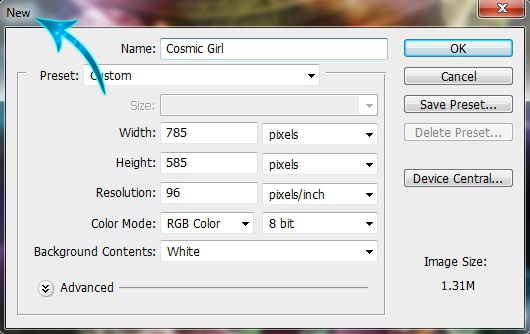
Step 2:- Now click on Layer> New> Layer. And create a new layer. Then select the “Paint Bucket Tool” and fill the background with # 000000.

Step 3:- Now open the Girl image and paste it to our file.

Step 4:- Select the Pen Tool and create a path along the girl.

Step 5:- Now right click on the path and select “Make selection”. Then copy and paste the selection.

Step 6:- Create a new layer and select differnt star brushes and use them randomly with color # ffffff.

Step 7:- Select the Eraser Tool and erase the stars from the middle.

Step 8:- Now open the marble image, then copy and paste the marble on the upper left corner.

Step 9:- Now duplicate the marble layer a few times, so for this right click on the layer and select “Duplicate Layer”.

Step 10:- Open the Fractal and place it on our file.

Step 11:- Change the blending mode of the fractal to “Overlay”.

Step 12:- Create a new layer and then select a soft round brush. Now use different colors to roughly cover the background.

Step 13:- Now change the blending mode of the above layer to “Color”.

Step 14:- Now select the Rectangle Tool and create a rectangle.

Step 15:- Change the blending mode of the rectangle to “Overlay”.

Step 16:- Now click on Layer> Layer style> Bevel and Emboss.

Step 17:- Now select the Eraser Tool and erase half of the rectangle from left side.

Step 18:- Simply duplicate the layer a few times.

And now we are done. We hope you guys enjoyed this colorful cosmic tutorial and learn something interesting.